About Stones Keeper
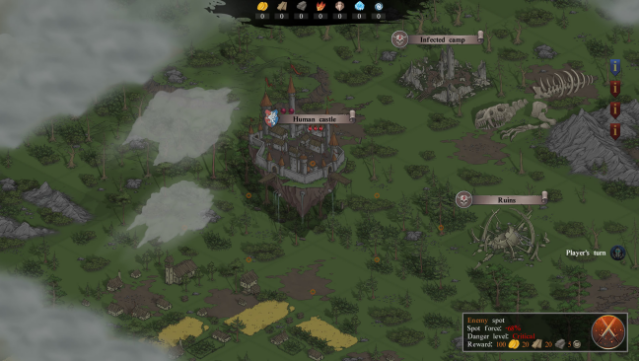
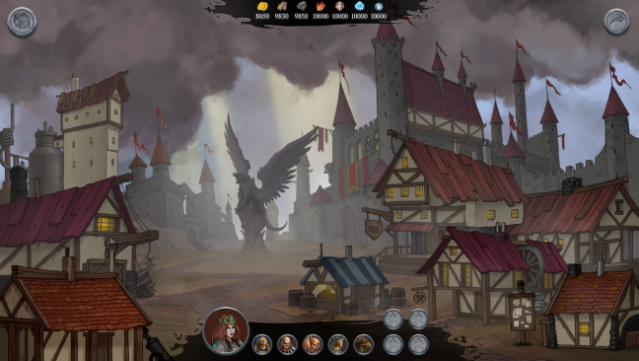
Imagine commanding a floating fortress as you delve into a world brimming with secrets and strategic combat. This turn-based game blends castle management with tactical battles, allowing you to recruit a diverse range of warriors and equip them for various challenges. As you navigate your mobile castle across the map, you engage in quests that involve besieging enemy settlements and protecting your own, all while unraveling an epic narrative tied to the Order of the Griffin.
The game shines with its dynamic environment, where players can use objects for cover or break them down for tactical advantages. With over 55 unique units, including Gryphon Riders and Elven Witches, you can customize your squad to suit your playstyle. The single-player campaign spans 15 hours and is packed with intriguing missions, while multiplayer modes let you team up with a friend or face off against others. Perfect for fans of strategic RPGs and castle management alike!

Instructions
- Click the Download button below and you will be redirected to UploadHaven.
- Wait 5 seconds and click on the blue ‘download now’ button. We recommend using a download manager for faster download speeds. (You can use FDM which is free here, or any other download manager).
- Once the game is finished downloading, right click the .zip file and click on “Extract to Stones Keeper.zip” (To do this you will need 7-Zip, which you can get here, or you can use the built in windows extractor).
- Double click inside the Stones Keeper folder and run the setup application. Accept the EULA, and install the game. Then, launch the game through the desktop shortcut.
Stones Keeper Free Download
Reminder: This download is completely free and won't cost you a penny. However, If you love the game and want to purchase it, you can support the developers by doing so here.
System Requirements
- OS: Windows 7
- Processor: Core i3 or equivalent
- Memory: 2 GB RAM
- Graphics: DirectX 11 or OpenGL 3.3 compatible video card
- Storage: 500 MB available space
- Sound Card: Any
Screenshots