About Ship Explorer
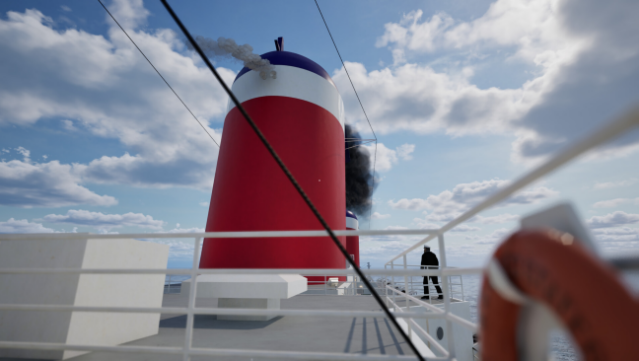
Embark on a unique maritime adventure that invites you to explore some of the most legendary ocean liners in history. This engaging experience allows you to walk the decks of iconic ships like the SS United States and Morro Castle, revealing the design innovations that made these giants of the sea so remarkable. The gameplay encourages you to interact with various objects onboard, unveiling historical insights through captivating dialogue.
You can also customize your exploration by adjusting the weather and time of day, creating the perfect atmosphere for your journey. Dive into pivotal moments from the vessels' past and capture stunning snapshots of your voyage using the photo mode. This experience is ideal for maritime enthusiasts and fans of ship history, offering a fresh perspective on the grandeur of ocean travel.

Instructions
- Click the Download button below and you will be redirected to UploadHaven.
- Wait 5 seconds and click on the blue ‘download now’ button. We recommend using a download manager for faster download speeds. (You can use FDM which is free here, or any other download manager).
- Once the game is finished downloading, right click the .zip file and click on “Extract to Ship Explorer.zip” (To do this you will need 7-Zip, which you can get here, or you can use the built in windows extractor).
- Double click inside the Ship Explorer folder and run the setup application. Accept the EULA, and install the game. Then, launch the game through the desktop shortcut.
Ship Explorer Free Download
Reminder: This download is completely free and won't cost you a penny. However, If you love the game and want to purchase it, you can support the developers by doing so here.
System Requirements
- Requires a 64-bit processor and operating system
- OS: Windows 10 version 21H1 (10.0.19043)
- Processor: AMD Ryzen 5 2600X, Intel Core i7-6800K
- Memory: 16 GB RAM
- Graphics: AMD Radeon RX 5700, NVIDIA GeForce 1070 Ti (8GB VRAM Minimum)
- DirectX: Version 12
- Storage: 10 GB available space
- Additional Notes: SSD Required
Screenshots