About Railroad Ink Challenge
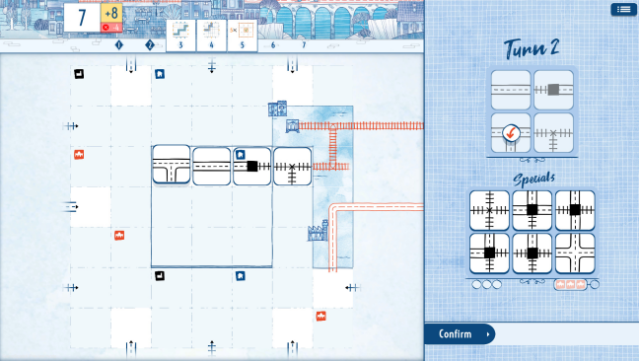
This game combines strategy and creativity in a fast-paced, engaging way. Set in a dynamic board game environment, players roll dice each round and sketch routes to connect exits on their boards. The core gameplay involves strategically designing a network of railways, highways, and stations to maximize points while avoiding penalties for incomplete connections. With seven rounds to make your mark, you'll find yourself balancing aggressive expansion with careful planning. You can play solo to beat your best scores or take on global opponents for a competitive edge. Perfect for fans of strategic puzzle games and those who enjoy a little friendly rivalry.
Instructions
- Click the Download button below and you will be redirected to UploadHaven.
- Wait 5 seconds and click on the blue ‘download now’ button. We recommend using a download manager for faster download speeds. (You can use FDM which is free here, or any other download manager).
- Once the game is finished downloading, right click the .zip file and click on “Extract to Railroad Ink Challenge.zip” (To do this you will need 7-Zip, which you can get here, or you can use the built in windows extractor).
- Double click inside the Railroad Ink Challenge folder and run the setup application. Accept the EULA, and install the game. Then, launch the game through the desktop shortcut.
Railroad Ink Challenge Free Download
Railroad Ink Challenge
Size: 167.00 MB
Reminder: This download is completely free and won't cost you a penny. However, If you love the game and want to purchase it, you can support the developers by doing so here.
System Requirements
- Requires a 64-bit processor and operating system
- OS: Windows 7 SP1+
- Processor: Dual Core 1.6 GHz or better
- Memory: 1 GB RAM
- Graphics: Integrated
- Storage: 500 MB available space
Screenshots