About Psionic Sentry: Infinite
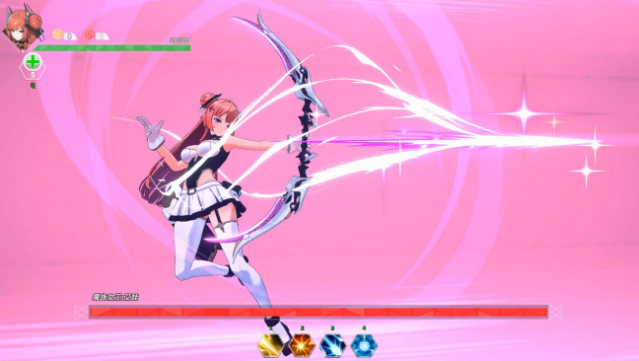
Dive into an exhilarating blend of anime aesthetics and action-packed gameplay with this unique roguelite shooter. Set in a vibrant world, you wield bows that can morph into scythes, allowing for a dynamic combat experience where counterattacking is a key strategy. The game emphasizes a forgiving counterattack mechanic, making it accessible to players of all skill levels, as you can deflect enemy projectiles with ease.
As you face off against foes, breaking their shields becomes essential to weaken them temporarily, adding a layer of strategy to your attacks. With a plethora of random skills to choose from, you can tailor your combat style, ensuring each run feels fresh and engaging. This game is perfect for fans of fast-paced action and those who love experimenting with different gameplay mechanics.

Instructions
- Click the Download button below and you will be redirected to UploadHaven.
- Wait 5 seconds and click on the blue ‘download now’ button. We recommend using a download manager for faster download speeds. (You can use FDM which is free here, or any other download manager).
- Once the game is finished downloading, right click the .zip file and click on “Extract to Psionic Sentry: Infinite.zip” (To do this you will need 7-Zip, which you can get here, or you can use the built in windows extractor).
- Double click inside the Psionic Sentry: Infinite folder and run the setup application. Accept the EULA, and install the game. Then, launch the game through the desktop shortcut.
Psionic Sentry: Infinite Free Download
Psionic Sentry: Infinite
Size: 1.18 GB
Reminder: This download is completely free and won't cost you a penny. However, If you love the game and want to purchase it, you can support the developers by doing so here.
System Requirements
- OS: Win 10 11
- Processor: Intel® Core™ i3
- Memory: 4 GB RAM
- Graphics: NVIDIA® GeForce® GTX 750
- Storage: 3 GB available space
- Additional Notes: 1. Native Linux cannot run directly, please use SteamOS. 2. It might be possible to play using the Steam Play Proton compatibility options. Check: The game runs well on Steam Deck. If you encounter any issues, feel free to report them here:
Screenshots