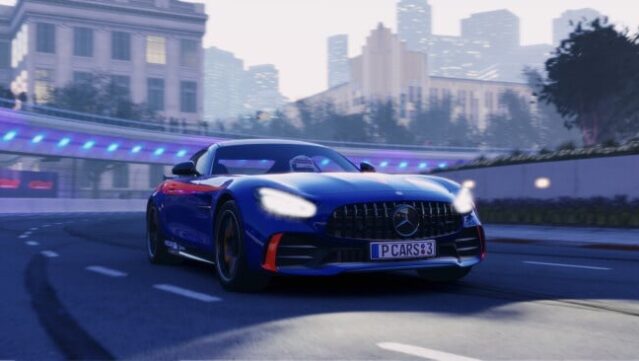
About Project CARS 3
Get ready to experience the thrill of racing like never before with an expansive selection of over 200 elite cars and more than 120 tracks from around the globe. This racing game combines realistic handling with a fun gameplay loop, allowing you to earn credits and XP while competing on a variety of challenging circuits. You can customize your ride with a wide array of upgrades and personalization options, crafting unique liveries inspired by both racing culture and community creativity.
With fully scalable assists, this title caters to players of all skill levels, ensuring that everyone can find their groove on the track. Dynamic weather and a day-night cycle further enhance the immersive experience, making every race feel unique. Ideal for racing enthusiasts and fans of simulation games, this title is a must-try for anyone looking to burn some rubber and push their driving skills to the limit.

Instructions
- Click the Download button below and you will be redirected to UploadHaven.
- Wait 5 seconds and click on the blue ‘download now’ button. We recommend using a download manager for faster download speeds. (You can use FDM which is free here, or any other download manager).
- Once the game is finished downloading, right click the .zip file and click on “Extract to Project CARS 3 v1.0.0.0.0724.zip” (To do this you will need 7-Zip, which you can get here, or you can use the built in windows extractor).
- Double click inside the Project CARS 3 v1.0.0.0.0724 folder and run the setup application. Accept the EULA, and install the game. Then, launch the game through the desktop shortcut.
Project CARS 3 Free Download (v1.0.0.0.0724)
Project CARS 3 (v1.0.0.0.0724)
Size: 49.02 GB
Reminder: This download is completely free and won't cost you a penny. However, If you love the game and want to purchase it, you can support the developers by doing so here.
System Requirements
- OS: Window 10 (+ speficic versions of 7)
- Processor: 3.5 GHz Intel Core i5 3450 or 4.0 GHz AMD FX-8350
- Memory: 8 GB RAM
- Graphics: GTX680 or equivalent
- DirectX: Version 11
- Storage: 50 GB available space
- Sound Card: Direct X compatible sound card
- Additional Notes: For VR or triple screen use, GTX980 or equivalent
Screenshots