About Guntech 2
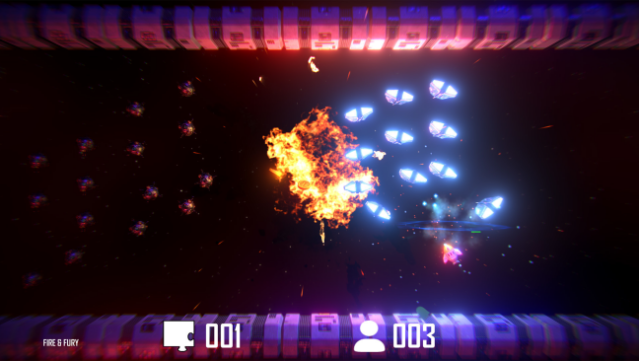
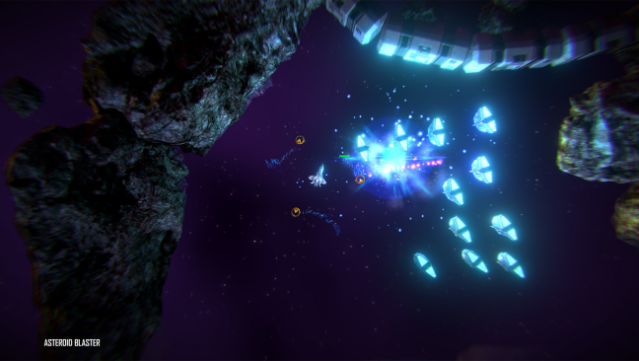
Dive into a vibrant world of retro-inspired twin-stick shooting action, where classic gameplay meets modern visuals in an exhilarating throwback to the cave flyer genre. In this game, you navigate through five unique worlds, each boasting multiple levels and a boss showdown, all while wielding three distinct weapons that let you blast enemies from various angles. Whether you prefer solo play or teaming up with friends in couch co-op for up to four players, the intuitive controls cater to both gamepads and keyboard setups.
With engaging game modes like ARCADE for quick runs and ADVENTURE for more exploratory play, you’ll face challenges that unlock additional stars for level completion. Seasonal missions add a whimsical touch to the gameplay, keeping things fresh and fun. If you’re a fan of fast-paced shooters like Geometry Wars or classic cave flyers, this game is definitely worth checking out.

Instructions
- Click the Download button below and you will be redirected to UploadHaven.
- Wait 5 seconds and click on the blue ‘download now’ button. We recommend using a download manager for faster download speeds. (You can use FDM which is free here, or any other download manager).
- Once the game is finished downloading, right click the .zip file and click on “Extract to Guntech 2 v2.50.zip” (To do this you will need 7-Zip, which you can get here, or you can use the built in windows extractor).
- Double click inside the Guntech 2 v2.50 folder and run the setup application. Accept the EULA, and install the game. Then, launch the game through the desktop shortcut.
Guntech 2 Free Download (v2.50)
Guntech 2 (v2.50)
Size: 1.62 GB
Reminder: This download is completely free and won't cost you a penny. However, If you love the game and want to purchase it, you can support the developers by doing so here.
System Requirements
- Requires a 64-bit processor and operating system
- OS: Windows 10
- Processor: Intel i5 or similar
- Memory: 8 GB RAM
- Graphics: NVidia GTX 460 | AMD RX 550
- Storage: 4 GB available space
Screenshots