About Dizzy Rogues
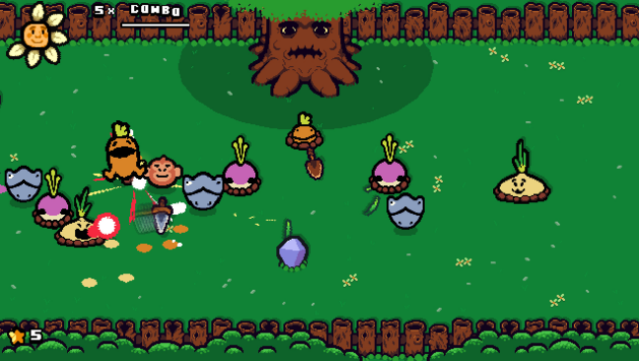
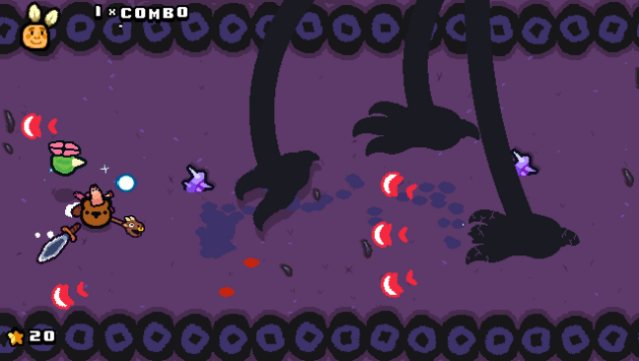
This game stands out with its unique blend of auto-running mechanics and turn-based combat, offering a fresh twist on roguelike gameplay. Players navigate through dynamic environments, utilizing a weapon that doubles as a shield while bouncing off enemies and obstacles to build impressive combos. The core loop revolves around mastering weapon positioning to maximize damage, all while strategically avoiding hazards.
One of the standout features is the treasure chest system, where players are rewarded based on their combo achievements at the end of levels. Additionally, players can collect star pieces left behind, which adds a layer of resource management to the fast-paced action. For those who enjoy engaging combat mechanics combined with quick reflexes, this game is definitely worth checking out. Perfect for fans of inventive roguelikes and action-packed challenges.

Instructions
- Click the Download button below and you will be redirected to UploadHaven.
- Wait 5 seconds and click on the blue ‘download now’ button. We recommend using a download manager for faster download speeds. (You can use FDM which is free here, or any other download manager).
- Once the game is finished downloading, right click the .zip file and click on “Extract to Dizzy Rogues.zip” (To do this you will need 7-Zip, which you can get here, or you can use the built in windows extractor).
- Double click inside the Dizzy Rogues folder and run the setup application. Accept the EULA, and install the game. Then, launch the game through the desktop shortcut.
Dizzy Rogues Free Download
Reminder: This download is completely free and won't cost you a penny. However, If you love the game and want to purchase it, you can support the developers by doing so here.
System Requirements
- OS: Windows 7 or later
- Processor: yes
- Memory: 1 GB RAM
- Graphics: you might want a screen
- DirectX: Version 10
- Storage: 250 MB available space
Screenshots