About Crocotile 3D
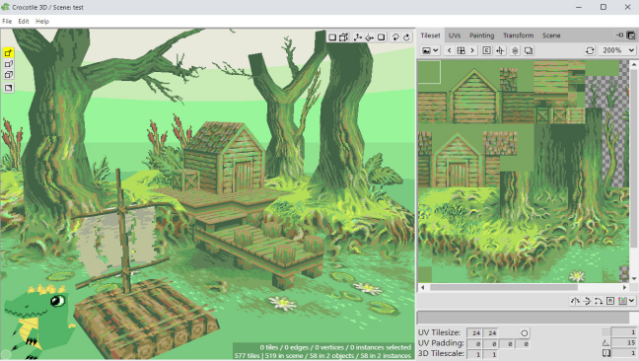
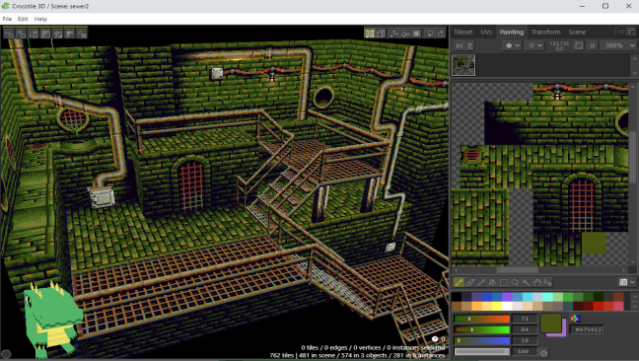
Dive into a unique modeling experience where 2D tiles transform into vibrant 3D scenes. Crocotile 3D stands out as a user-friendly tile-based editor, making it accessible for anyone looking to create low-poly models without the complexity often found in traditional 3D software. Set in a creatively liberating environment, players can easily drag and drop tiles from their chosen tilesets to construct intricate designs. The intuitive editing tools allow for quick modifications and imaginative sculpting, ensuring that your pixel-art visions come to life in three dimensions. This game is perfect for fans of retro aesthetics and indie development, inviting creators of all skill levels to explore their artistic potential.
Instructions
- Click the Download button below and you will be redirected to UploadHaven.
- Wait 5 seconds and click on the blue ‘download now’ button. We recommend using a download manager for faster download speeds. (You can use FDM which is free here, or any other download manager).
- Once the game is finished downloading, right click the .zip file and click on “Extract to Crocotile 3D v2.3.9.zip” (To do this you will need 7-Zip, which you can get here, or you can use the built in windows extractor).
- Double click inside the Crocotile 3D v2.3.9 folder and run the setup application. Accept the EULA, and install the game. Then, launch the game through the desktop shortcut.
Crocotile 3D Free Download (v2.3.9)
Crocotile 3D (v2.3.9)
Size: 197.97 MB
Reminder: This download is completely free and won't cost you a penny. However, If you love the game and want to purchase it, you can support the developers by doing so here.
System Requirements
- OS *: Windows 7, Windows 8, Windows 8.1, Windows 10 or later
- Processor: An Intel Pentium 4 processor or later that’s SSE2 capable
- Storage: 250 MB available space
Screenshots