About Secret Little Haven
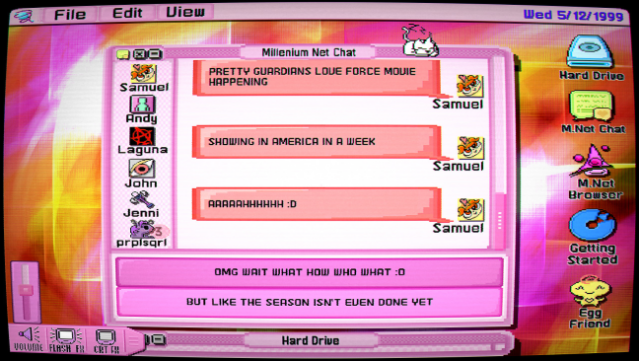
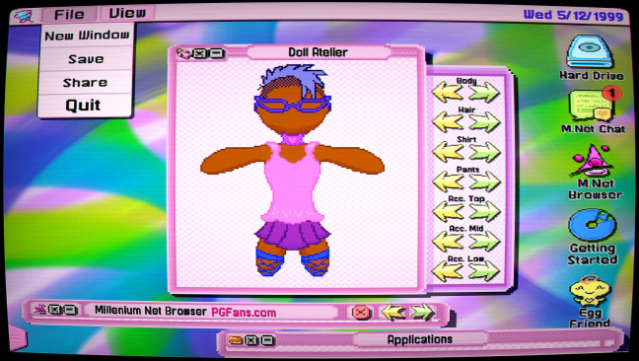
Dive into a nostalgic journey of self-discovery and community in this unique title set in the late '90s. You step into the shoes of Alex Cole, a teenage trans girl navigating her identity while immersed in the vibrant world of the early internet. The game blends adventure and simulation, allowing players to explore SanctuaryOS—a lovingly crafted operating system filled with interactive applications like a web browser, chat client, and even a doll maker. As you chat with friends and scour through fan forums dedicated to magical girl shows, you uncover treasures that spark creativity and connection. With its heartfelt exploration of fandom, gender identity, and the magic of old computers, this experience resonates deeply. Perfect for fans of narrative-driven games and those who appreciate the charm of retro internet culture.

Instructions
- Click the Download button below and you will be redirected to UploadHaven.
- Wait 5 seconds and click on the blue ‘download now’ button. We recommend using a download manager for faster download speeds. (You can use FDM which is free here, or any other download manager).
- Once the game is finished downloading, right click the .zip file and click on “Extract to Secret Little Haven.zip” (To do this you will need 7-Zip, which you can get here, or you can use the built in windows extractor).
- Double click inside the Secret Little Haven folder and run the setup application. Accept the EULA, and install the game. Then, launch the game through the desktop shortcut.
Secret Little Haven Free Download
Secret Little Haven
Size: 115.45 MB
Reminder: This download is completely free and won't cost you a penny. However, If you love the game and want to purchase it, you can support the developers by doing so here.
System Requirements
- OS *: Windows XP
- Processor: Intel Core 2 Duo
- Memory: 1024 MB RAM
- Graphics: Integrated
- Storage: 115 MB available space
- Sound Card: Windows Sound System
- Additional Notes: Some optional extras in the game can only be played on a classic Mac.
Screenshots