About How to Say Goodbye
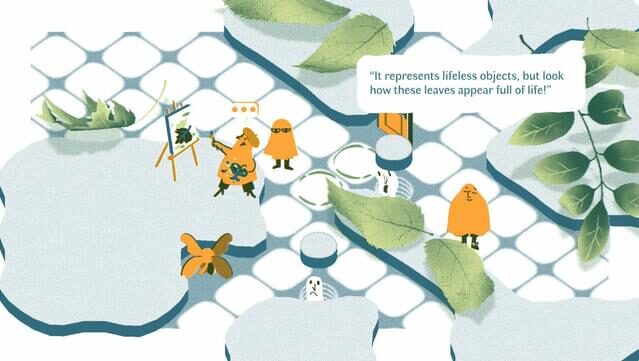
Step into a captivating realm where you guide lost spirits through an enchanting limbo as a newly transformed ghost. This narrative puzzle game combines storytelling with brain-teasing challenges, inviting players to manipulate the environment to help disoriented souls find their way. The gameplay revolves around solving intricate grid-based puzzles that unlock pathways across over 15 immersive chapters, from familiar settings like your kitchen to the whimsical landscape of the moon. The unique twist lies in the player's ability to shift decor to aid the spirits, all while unraveling the mystery of a shadowy wizard. If you appreciate heartfelt stories and clever puzzles, this game is definitely worth exploring.

Instructions
- Click the Download button below and you will be redirected to UploadHaven.
- Wait 5 seconds and click on the blue ‘download now’ button. We recommend using a download manager for faster download speeds. (You can use FDM which is free here, or any other download manager).
- Once the game is finished downloading, right click the .zip file and click on “Extract to How to Say Goodbye v1.0.6.zip” (To do this you will need 7-Zip, which you can get here, or you can use the built in windows extractor).
- Double click inside the How to Say Goodbye v1.0.6 folder and run the setup application. Accept the EULA, and install the game. Then, launch the game through the desktop shortcut.
How to Say Goodbye Free Download (v1.0.6)
How to Say Goodbye (v1.0.6)
Size: 295.94 MB
Reminder: This download is completely free and won't cost you a penny. However, If you love the game and want to purchase it, you can support the developers by doing so here.
System Requirements
- Windows 7 SP1+
- SSE2 instruction set support
- 4 GB RAM
- DX10 (shader model 4.0)
- Version 10
- 1000 MB available space
Screenshots