About MyDockFinder
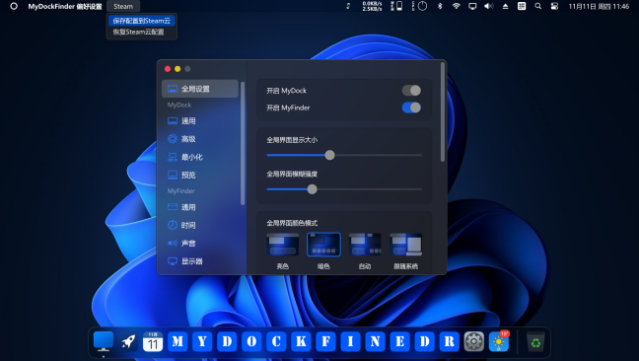
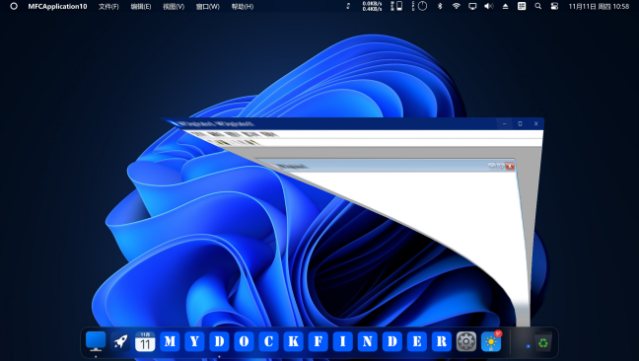
This software transforms your desktop into a sleek, customizable launcher that enhances your workflow and system control. It blends utility and aesthetics with its GPU-rendered graphics, smooth animations, and adjustable blur effects. You can easily drag and drop your favorite applications or files onto a dock for instant access, while enjoying unique minimization animations for your windows. With regular updates promising new features like creative workshops and customizable skins, this tool evolves alongside your needs. If you're looking to streamline your PC experience while keeping it visually appealing, this software is perfect for you.

Instructions
- Click the Download button below and you will be redirected to UploadHaven.
- Wait 5 seconds and click on the blue ‘download now’ button. We recommend using a download manager for faster download speeds. (You can use FDM which is free here, or any other download manager).
- Once the game is finished downloading, right click the .zip file and click on “Extract to MyDockFinder v1.10.4.zip” (To do this you will need 7-Zip, which you can get here, or you can use the built in windows extractor).
- Double click inside the MyDockFinder v1.10.4 folder and run the setup application. Accept the EULA, and install the game. Then, launch the game through the desktop shortcut.
MyDockFinder Free Download (v1.10.4)
MyDockFinder (v1.10.4)
Size: 82.40 MB
Reminder: This download is completely free and won't cost you a penny. However, If you love the game and want to purchase it, you can support the developers by doing so here.
System Requirements
- OS: Windows 10 (version 1809 and higher), supports Windows 11
- Processor: Dual-core processor 1.2GHz
- Memory: 512 MB RAM
- Graphics: Support DirectX11 graphics card, 256M video memory
- DirectX: Version 11
- Network: Broadband Internet connection
- Storage: 20 MB available space
- Additional Notes: VC++2019 runtime library 32 and 64 bit .NET framework 4.8
Screenshots