About Die After Sunset
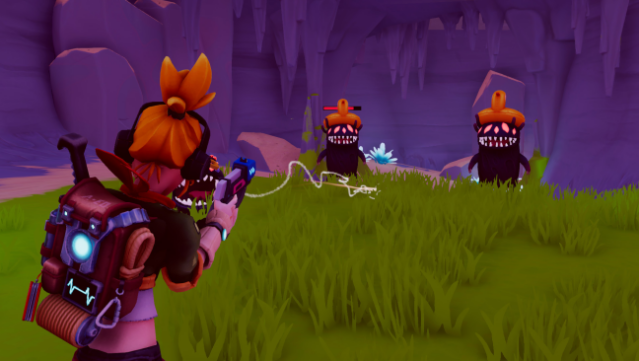
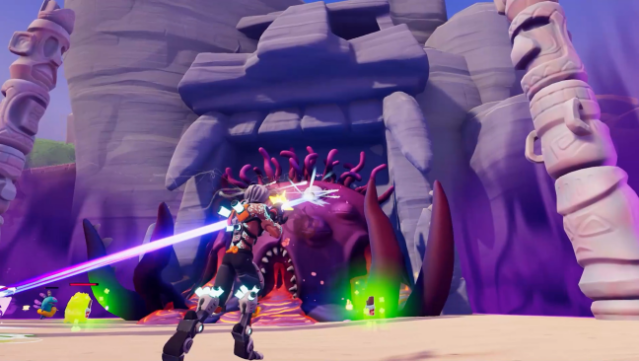
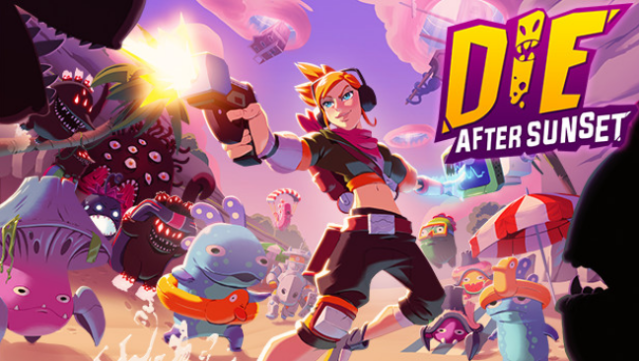
In a world overwhelmed by quirky alien invaders known as the Murkors, players dive into a thrilling roguelite shooter that combines frantic gameplay with a unique twist: the sun is your ally. Set in a dystopian 2120, you take on the role of a defender tasked with pushing back these bizarre foes while racing against the clock before nightfall arrives. Each run is a fresh adventure, featuring randomized quests and diverse locations that keep gameplay exciting.
Choose from three distinct characters, each equipped with their own weaponry and special abilities, and engage in intense battles against towering bosses. As you collect items and currency, known as "Mucus," you can enhance your abilities, unlocking new weapons and upgrades to help you survive. This game is perfect for fans of action-packed shooters who enjoy strategic gameplay and a dash of humor.
Instructions
- Click the Download button below and you will be redirected to UploadHaven.
- Wait 5 seconds and click on the blue ‘download now’ button. We recommend using a download manager for faster download speeds. (You can use FDM which is free here, or any other download manager).
- Once the game is finished downloading, right click the .zip file and click on “Extract to Die After Sunset v1.0.3.zip” (To do this you will need 7-Zip, which you can get here, or you can use the built in windows extractor).
- Double click inside the Die After Sunset v1.0.3 folder and run the setup application. Accept the EULA, and install the game. Then, launch the game through the desktop shortcut.
Die After Sunset Free Download (v1.0.3)
Die After Sunset (v1.0.3)
Size: 3.27 GB
Reminder: This download is completely free and won't cost you a penny. However, If you love the game and want to purchase it, you can support the developers by doing so here.
System Requirements
- Requires a 64-bit processor and operating system
- OS: Windows 7 SP1+, Windows 8 and Windows 10
- Processor: Intel® Core™ i5-4460, 3.20GHz / AMD FX™-6300
- Memory: 8 GB RAM
- Graphics: Nvidia GTX 650-Ti / AMD Radeon HD 7790
- Storage: 3 GB available space
- Sound Card: DirectX compatible sound card
Screenshots