About Private Military Manager: Tactical Auto Battler
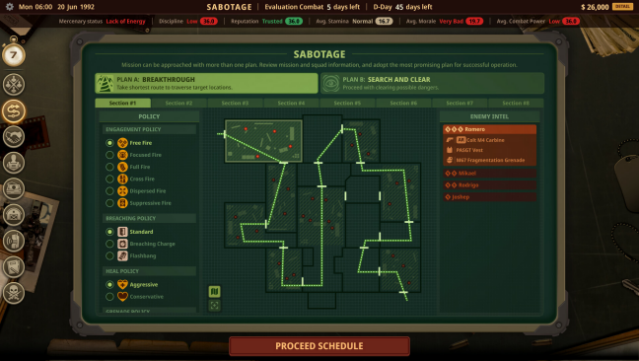
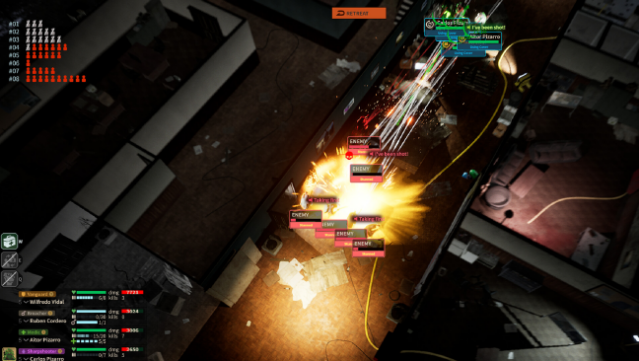
Step into the chaotic world of 1990s South America, where you run a private military company amidst the turmoil of drug cartels, corrupt authorities, and rebel factions. This tactical auto battler challenges you to devise effective strategies and issue commands without directly controlling your mercenaries. The core gameplay revolves around preparing for missions by analyzing combat simulations and adjusting your team’s tactics, weaponry, and engagement rules for close quarters battles.
With each mission, you must adapt and refine your approach, as success often requires multiple attempts. Recruiting new mercenaries and growing your squad’s capabilities is vital to overcoming the ever-changing challenges. This game is perfect for fans of strategy and management titles who enjoy a blend of tactical planning and military simulations.

Instructions
- Click the Download button below and you will be redirected to UploadHaven.
- Wait 5 seconds and click on the blue ‘download now’ button. We recommend using a download manager for faster download speeds. (You can use FDM which is free here, or any other download manager).
- Once the game is finished downloading, right click the .zip file and click on “Extract to Private Military Manager: Tactical Auto Battler.zip” (To do this you will need 7-Zip, which you can get here, or you can use the built in windows extractor).
- Double click inside the Private Military Manager: Tactical Auto Battler folder and run the setup application. Accept the EULA, and install the game. Then, launch the game through the desktop shortcut.
Private Military Manager: Tactical Auto Battler Free Download
Private Military Manager: Tactical Auto Battler
Size: 1.77 GB
Reminder: This download is completely free and won't cost you a penny. However, If you love the game and want to purchase it, you can support the developers by doing so here.
System Requirements
- Requires a 64-bit processor and operating system
- OS: Windows 10 (64bit)
- Processor: Intel(R) Core(TM) i5-9400F CPU @ 2.90GHz 2.90 GHz
- Memory: 8 GB RAM
- Graphics: NVIDIA GeForce GTX 1660
- DirectX: Version 12
- Storage: 10 GB available space
- Sound Card: Any
Screenshots